
We have made it clearer how the Billetto fee affects your ticket price and your earnings as an organizer. When you create a ticket, you can now clearly see the ticket price, the Billetto fee, and the amount you receive. You can also see how these amounts change when you choose to include or add the fee in the ticket price.
This makes it easier to understand what you actually earn on each ticket and helps you set the right price from the start. At the same time, it gives you a better basis for understanding your sales reports, payouts, and bookkeeping—helping you avoid surprises later.
How to include or add the Billetto fee
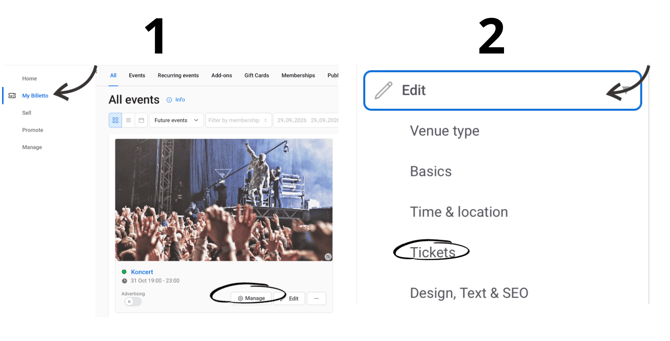
- Select My Billetto
- Press Manage
- Click Edit
- Select Tickets
- Click on the three dots under "Tickets"
- Then press Edit
- Press Advanced options

If you include the fee: The Billetto fee is deducted from the displayed ticket price. This means the amount you receive as an organizer will be lower.
If you add it to the price: The Billetto fee is added on top of the ticket price, so the buyer pays the fee separately.