
You can now promote your memberships throughout the ticket buying journey, making it easier for ticket buyers to discover and sign up for memberships before purchasing tickets.
Ticket buying pageYou can now add a dedicated membership promotion section directly on the ticket buying page.
This section includes:
- A short value proposition explaining the benefits of becoming a member.
- A prominent Become a member button.
- A direct link to your selected membership.
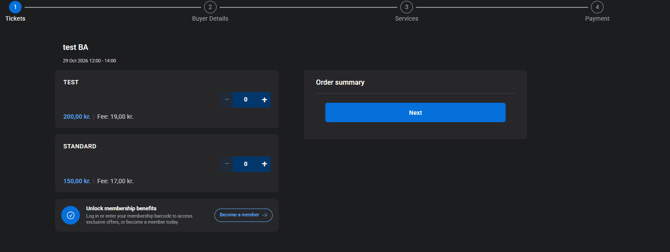
This is controlled through a new event-level toggle, allowing you to choose whether to display the promotion and which membership the Become a member button should link to.
Event page
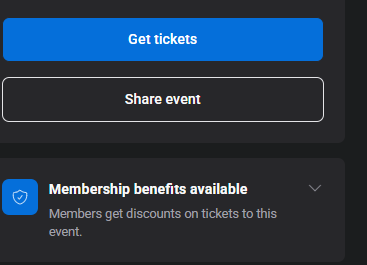
If your event offers membership benefits, you can now display a Promote membership benefits section on the event page.
This section explains that membership discounts are available and shows buyers how they can access them—for example, by logging in or using their membership barcode.
To enable this feature:
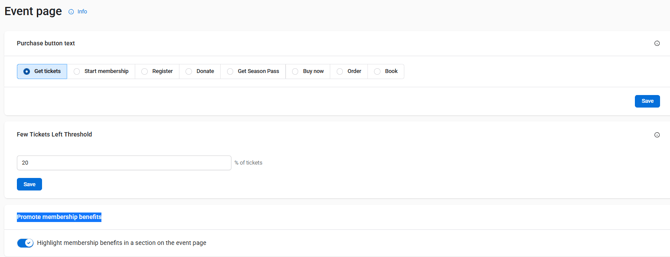
- Go to the event where you want to activate the membership promotion.
- Go to Customisation & Design.
- Click Event Page.
- Enable Promote membership benefits.
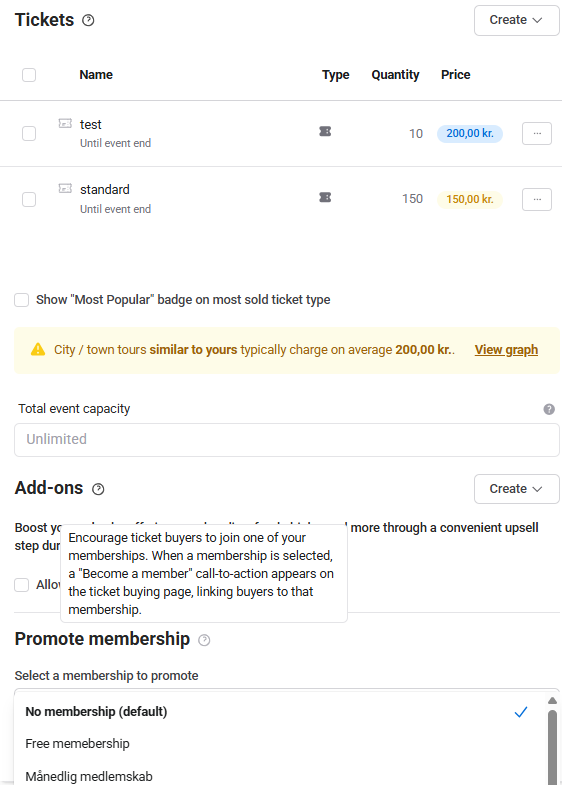
- Go to Edit → Tickets.
- Select the membership you want to promote for the event.
Once enabled, buyers will see information about your membership benefits on the event page, making it easier for them to understand how to access available discounts before purchasing tickets.
Benefits
Promoting memberships on your event and ticket buying pages gives you a simple, non-intrusive way to promote your memberships when buyers are most engaged.
This can help increase:
- Membership awareness.
- Membership sign-ups.
- Repeat customer loyalty.