If you don’t want to display when your event ends, you can easily hide the end time in the event settings. Only communicate the information that’s necessary, and avoid confusing ticket buyers or giving them a misleading impression of the event’s duration.
How to hide the end time from ticket buyers
Follow these steps:
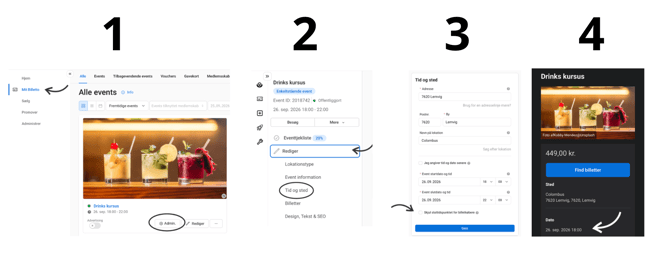
- Go to "My Biletto"
- Click "Manage": Find the relevant event where you want to hide the end time and click "Mange".
- Click "Edit"
- Select "Time and location": In the editing menu, select "Time and location".
- Hide the end time: Find the setting "Hide end time from ticket buyers" and activate it.
Once the setting is activated, the end time will no longer be displayed to ticket buyers.