
You are always in full control of Billetto Advertising. You decide if it should be enabled or disabled on your account and events. You can manage it on your Events or your Account.
You can have it turned off on your Account, but have it turned on for individual Events and the other way around. Billetto Advertising should be seen as an aid for events where you cannot sell all the tickets yourself. We take all the investment risk (we invest our own marketing budget) and only charge for the share of tickets you have attributed to us when there is a sale of those tickets. This means that we only charge you for the tickets that are attributed to the Billetto Advertising and sold through our marketing efforts. If the tickets were sold through other channels, we do not charge you the advertising fee.
For example: If you attribute 20% of the tickets to Billetto Advertising, this does not mean that you cannot sell these tickets yourself. So there are just fewer tickets for Billetto to sell if you manage to sell more than 80% of the tickets on sale.
To view information about pricing plans, see here
To view information about managing channels, see here
To pause or turn off Billetto Advertising on the Event Level:
- Click on ''My Billetto'';
- Click Manage on the event;
- Click on Billetto Advertising on the left hand side
- Click on Setting
- Click on Disable/Enable
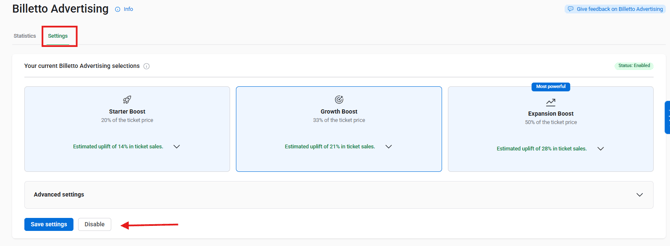
To pause or turn off Billetto Advertising on the Account Level:
- Click on ''Promote'' in the top bar
- Click on ''Billetto Advertising''
- Click on the dropdown menu next to Limit or disable Billetto Advertising
- Click on “Deactivate Billetto Advertising” button. Here, you can choose to deactivate Billetto Advertising for all published events.
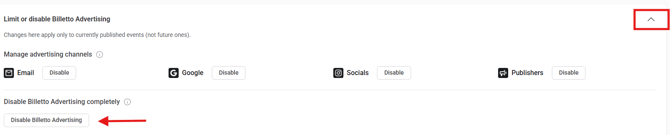
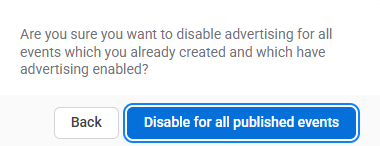
You can also go to My Billetto and activate or deactivate Billetto Advertising by clicking the toggle button.

How to increase or decrease advertising
On the Event Level:
- Click ''My Billetto'';
- Click ''Overview'' on the event;
- Click on ''Billetto Advertising'' in the left navigation;
- Click on Setting
- Here, you can choose between 3 different packages:
- Starter Boost — 20% of the ticket price
- Growth Boost — 33% of the ticket price
- Expansion Boost — 50% of the ticket price
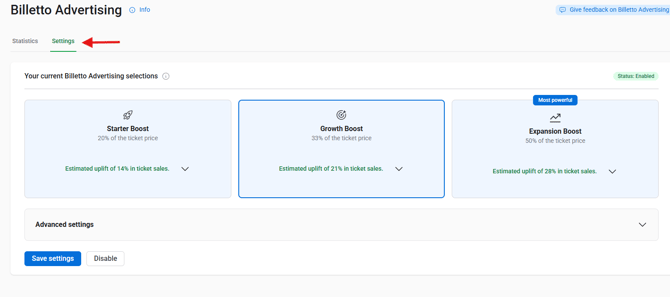
- Scroll to the Advanced settings
- Here, you can configure Advertising Channels and Tickets allocated to Billetto Advertising.
- Choose if it should be a number of tickets or a % rate of the tickets;
- Now enter the number of tickets you want Billetto to sell;
- If you type 10 and have selected a number, it means you want Billetto to sell 10 tickets via advertising, and if you have selected % and 10, it means you want Billetto to sell 10% of the tickets you have put on sale via advertising.
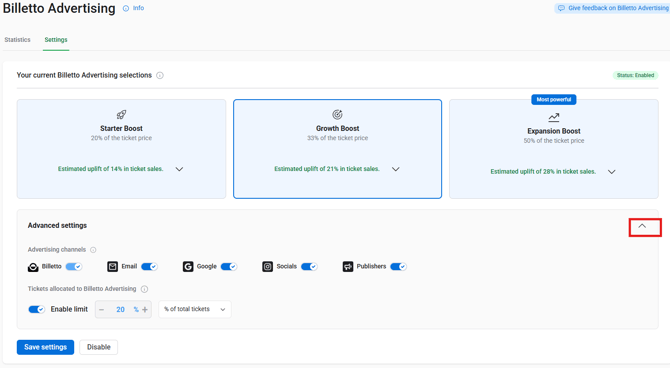
- Click ''Save''.
On the Account Level:
-
Click ''Promote'';
-
Click ''Billetto Advertising'';
- Click on Setting
- Here, you can choose between 3 different packages:
- Starter Boost — 20% of the ticket price
- Growth Boost — 33% of the ticket price
- Expansion Boost — 50% of the ticket price
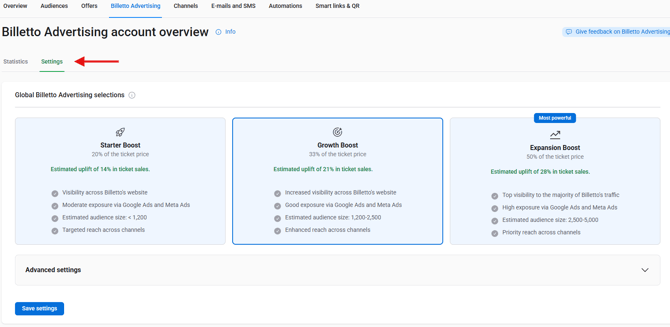
- Scroll to the Advanced settings
- Here, you can configure Advertising Channels and Tickets allocated to Billetto Advertising.
-
Set the % share you want Billetto to sell via advertising;
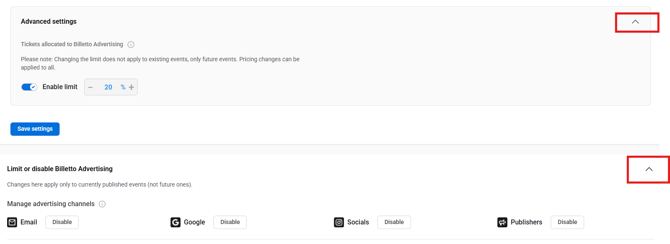
Please note: Changes made to “Tickets allocated to Billetto Advertising” will not apply to existing events, only to future events. Price changes can be applied to all events.
NOTE: If you set a different option on an event than on your account, that is what applies. So if Billetto Advertising is turned off on an Event but active on your Account, then an Event that has it turned off will not have paid advertising. If you have set a different Billetto Advertising setting on an Event than on your account, the setting on the event will be what applies.