
Email Automations: Streamline Communication for Your Events
Keeping attendees informed before, during, and after an event is essential for creating a great customer experience. With Billetto’s new Automations feature, organizers can now automate attendee communication and manage reusable email flows directly from their account.
Instead of manually creating and sending emails for every individual event, organizers can set up an automation once — and it will automatically handle communication for all selected events going forward.
What Are Email Automations?
Email Automations allow organizers to automatically send emails to attendees based on the timing of an event. Emails can be scheduled before, during, or after an event, helping organizers maintain consistent communication throughout the attendee journey.
Typical use cases include:
-
Welcome emails for new attendees
-
Event reminders before the event starts
-
Important live-event updates
-
Thank-you emails after the event
-
Feedback and survey requests
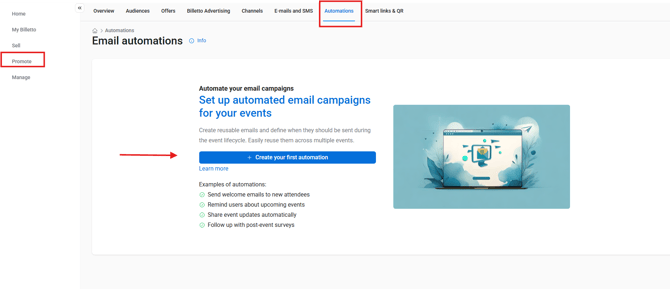
The feature is available under the Promote section in the organiser dashboard. Click on , and then Create your first automation.
How It Works
When creating an automation, organisers define:
-
When the email should be sent
-
Which events the automation applies to
-
What the email should contain
Scheduling Your Automation
Choose when your automated emails should be sent during the event lifecycle.
Available Schedule Types
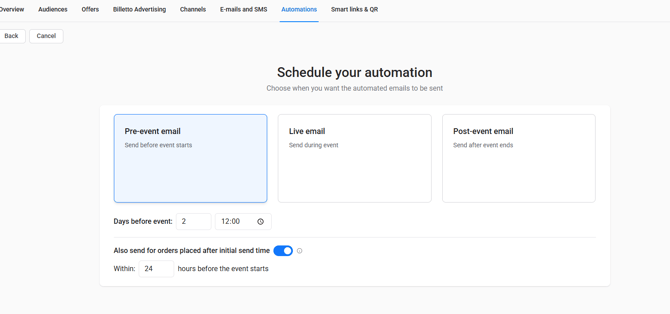
Pre-event Email
Send emails before the event starts, such as reminders or practical information.
Live Email
Send emails during the event for live updates or announcements.
Post-event Email
Send emails after the event ends, such as thank-you emails or surveys.
Scheduling Options
For pre-event emails, you can choose:
- How many days before the event the email should be sent
- The exact send time
You can also enable:
“Also send for orders placed after initial send time”
This ensures attendees who buy tickets after the original send still receive the email automatically.
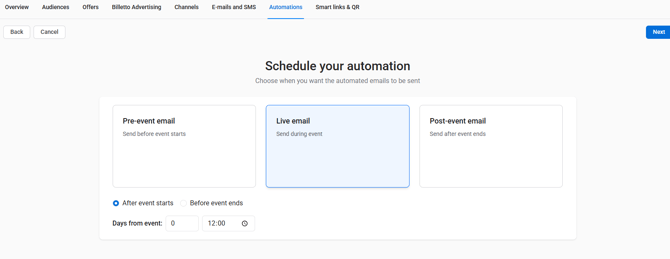
Live emails are sent while the event is taking place.
You can choose whether the email should be sent:
- After the event starts
- Before the event ends
Then define:
- The number of days from the event timing
- The exact send time
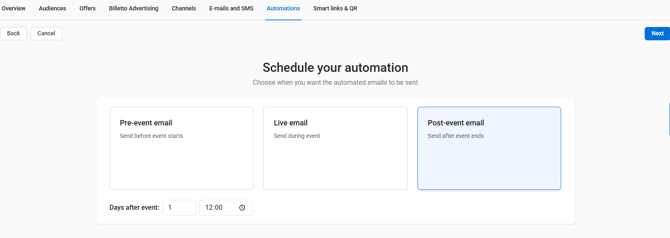
Post-event emails are sent after the event ends.
Choose:
- How many days after the event the email should be sent
- The send time
Once activated:
-
The system automatically creates campaigns for each connected event
-
Emails are sent automatically at the scheduled time
-
All ticket buyers for the selected event receive the email
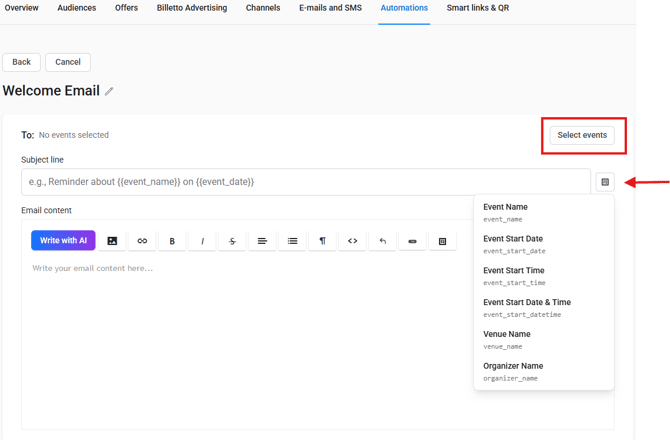
Automations support dynamic variables that automatically insert event information into emails, including:
-
Event name
-
Event start date and time
-
Venue name
-
Organizer name
This makes it possible to create one reusable email template that automatically adapts across multiple events.
Event Selection Options
Organizers can choose exactly which events an automation should apply to:
-
Individual events
-
Multiple selected events
-
All future events
Events can be searched using event names or event IDs, making it easy to manage communication at scale.
Review and confirm
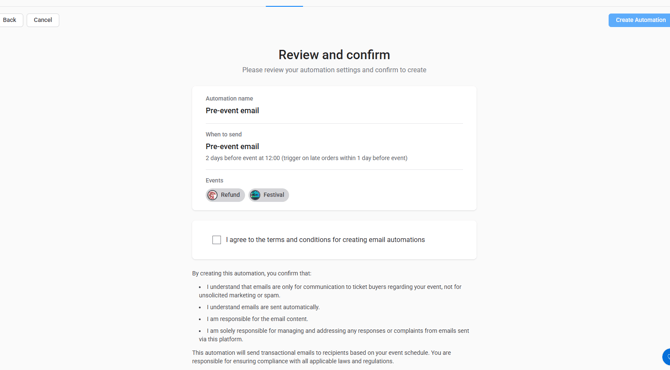
As an organizer, you must first review the automation details on the confirmation page. You then need to tick the checkbox confirming that you agree to the terms and conditions for creating email automations. Finally, click the blue “Create Automation” button in the top-right corner of the page.
Once this is completed, the automation will become active, and pre-event emails will automatically be sent to your ticket buyers according to the selected schedule.
Managing Automations
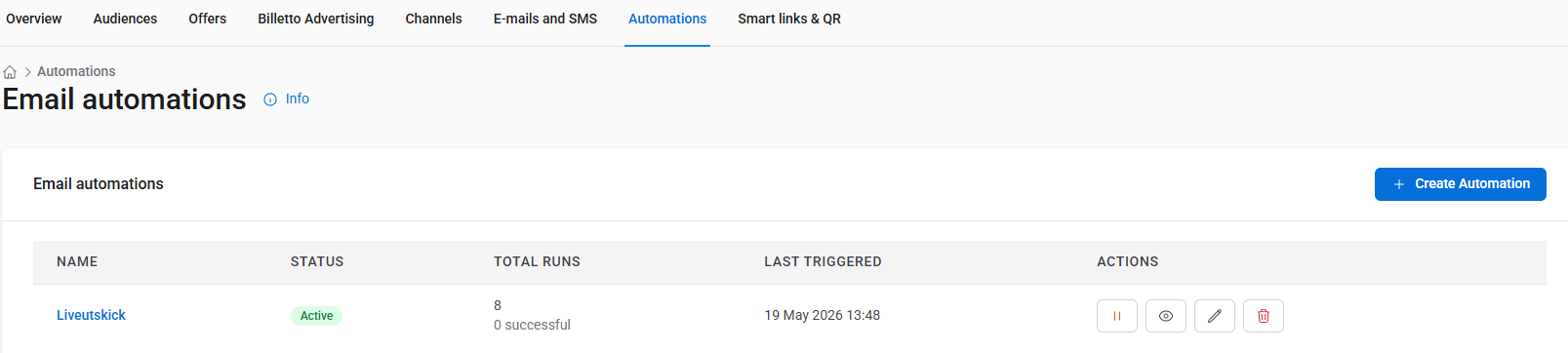
The Email Automations dashboard allows organizers to:
- View all automations and their status
- See full configuration and generated campaigns
- Edit campaigns (add/remove events, edit email content)
- Pause and reactivate automations
- Delete automations you no longer need
Campaign performance data is also available, including:
- See all campaigns created by automations
- Track campaign status (scheduled, sending, completed)
- View performance statistics (sent, successful, faile
Key Benefits
- Save time: Set up once and reuse across all events
- Consistency: Ensure every event has the same communication flow
- Personalization: Emails can automatically include event details (name, date, venue)
- Better engagement: Send emails at optimal times
- Scalability: Manage communication across unlimited events
Event Requirements
Automations currently only work for events that include:
-
A start date and time
-
An end date and time
The feature does not currently support:
-
Recurring events
-
Memberships
-
Events without dates